Fred NXT POS 45 2022 (6 May 2022)
Release Notes
New in Fred NXT POS
Accounts Comments at POS
Comments that are added to Customer Accounts in Fred NXT Office are now visible at the POS. Previously these comments could only be viewed in Fred NXT Office.
For example, below is a comment added to a Customer Account.
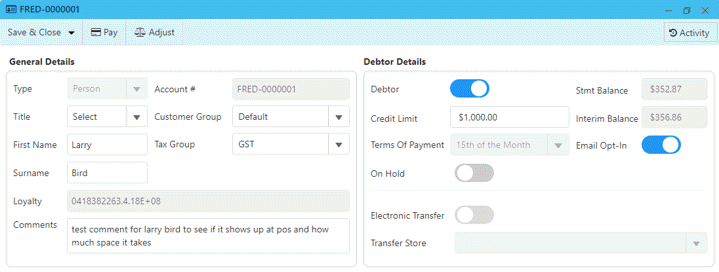
The comments display below the customer address field at the POS.

RRP Price Savings
A new feature has been added to POS to allow Groups to show savings against vendor RRP. In order to use this feature, the RRP prices need to be maintained by the Group.
Set up RRP Prices
Trade agreement prices need to be loaded/created against a Price Group of RRP with vendor RRP pricing as shown below:

Retail Configuration
Fred needs to set up parameters to indicate that the Group is using RRP pricing and savings.
The wording that shows on the receipt can be customised. The Group needs to advise wording of this text and if any additional options—larger font, bold.
Larger font size and bold text reduces the number of characters in the text. Fred can test and help with what will fit.
RRP Logic
The logic to calculate the savings for customer has been updated as follows:
-
If the item has an RRP price and it is greater than the normal store price, calculate savings using the RRP price for the item.
For example, Brauer Pawpaw Lip Balm has a RRP price of $6.99. Normal store price is $3.99. Savings is calculated as follows: 6.99-3.99=3.00.
-
If the above savings is greater than any current promo discount, then use it to show the savings. Otherwise, use the promo discount.
-
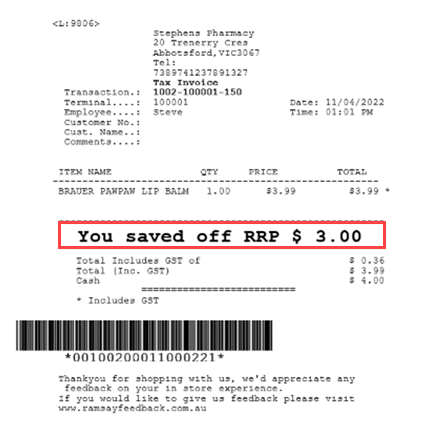
Wording on receipt for saving only shows if there has been a saving/discount and will show the price and the configured text.
Receipt example
Example below shows saving or item of $3.00 which is savings off RRP even though the item is not on Promotion.
Text configuration has been configured to say “You saved off RRP” and has been set to bold and larger font.
 Search Tips
 Fred Learning Pathways